Overview:
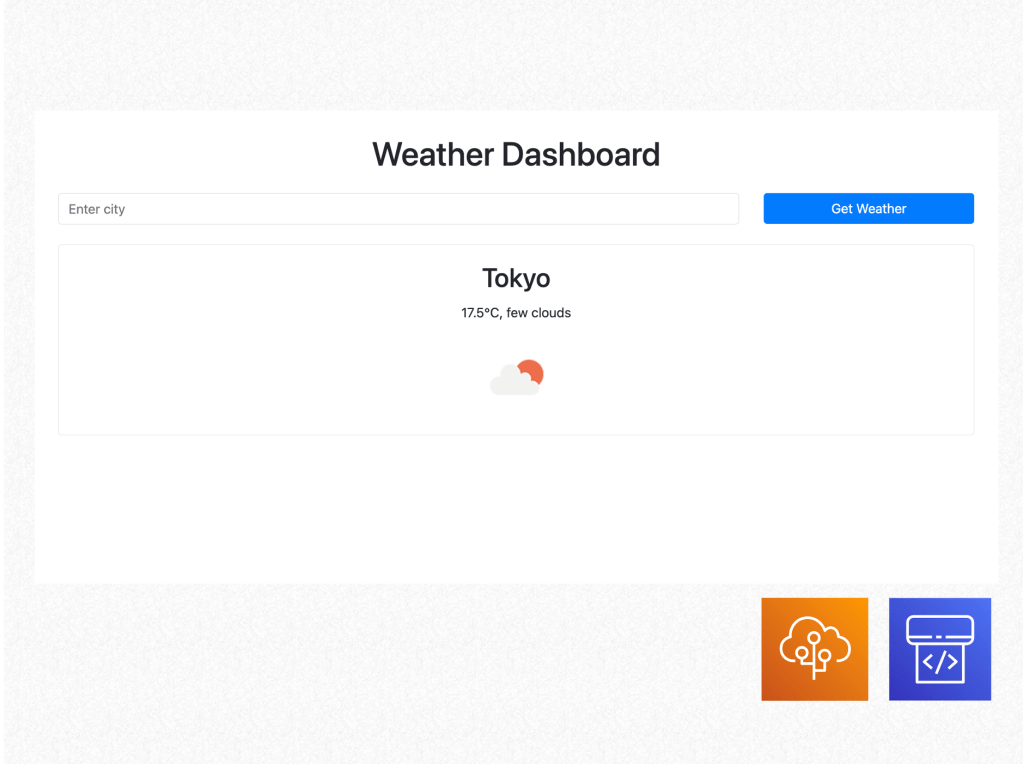
The Weather Search Website is designed to offer a simple yet powerful tool for users to retrieve current weather data by entering the name of any city. The site uses the OpenWeatherMap API to fetch real-time weather data, which includes the current temperature, weather conditions, and an icon representing the weather.
Key Features:
- City-based Weather Search:
- Users can enter the name of any city into the search bar, and the site will return real-time weather data for that city. The results include the temperature (in Celsius), a short description of the weather (e.g., sunny, cloudy), and a weather icon representing the conditions (such as sun, rain, or snow).
- Weather Data Display:
- Once the city is entered and weather data is retrieved, it is displayed in a clean, card-based layout that includes the city name, temperature, weather description, and an image icon. This layout ensures that users can easily understand the information provided at a glance.
- Error Handling:
- If a user enters an invalid city name or the city cannot be found in the OpenWeatherMap API, the app displays a friendly error message to prompt the user to try again.
- Responsive Design:
- The site is built using Bootstrap, which ensures that the layout is responsive and user-friendly across all devices, including desktops, tablets, and smartphones.
- AWS Integration for Scalability:
- AWS Elastic Beanstalk is used to deploy the Weather Search Website, providing scalability, load balancing, and easy management of server resources. As traffic increases, Elastic Beanstalk automatically provisions the necessary resources, ensuring the site remains responsive and available.
- CI/CD Pipeline:
- AWS CodePipeline is integrated into the project, automating the deployment process. Every time new code is pushed to the repository, CodePipeline builds, tests, and deploys the latest version of the application to Elastic Beanstalk.
Tech Stack:
- Backend: Flask (Python)
- Flask serves as the web framework for the backend, handling the routing and API calls to OpenWeatherMap. It efficiently processes user requests and displays the retrieved weather data on the frontend.
- API: OpenWeatherMap API
- The OpenWeatherMap API is used to fetch real-time weather data for any city entered by the user. The API provides temperature, weather descriptions, and icons, ensuring that the information presented is both accurate and visually engaging.
- Frontend: HTML, CSS, Bootstrap
- The frontend is built using HTML and CSS, with Bootstrap providing the responsive design. The user interface is kept simple yet functional, ensuring that the weather data is presented clearly.
- AWS Elastic Beanstalk:
- AWS Elastic Beanstalk handles the deployment of the application, automatically managing infrastructure provisioning, load balancing, scaling, and monitoring.
- AWS CodePipeline:
- AWS CodePipeline is used to automate the CI/CD process, ensuring that new updates are automatically built, tested, and deployed when code changes are pushed to the repository
Category:
Tags:
Links:
 Portfolio
Leave a comment