Overview:
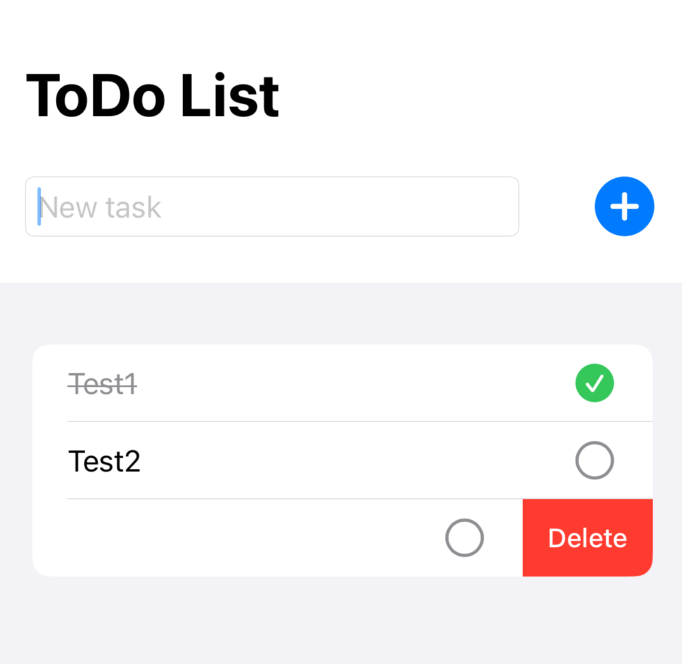
This is the simple ToDo App using SwiftUI and Core Data to build interactive and reactive iOS applications. With features like real-time updates, task management, and a clean UI, this app showcases to create user-friendly interfaces with minimal code.
Screenshots

Key Features:
- Add Tasks
- The user can easily add tasks through a simple input field. This allows for quick entry of tasks and updates to the task list in real-time.
- Delete Tasks
- Tasks can be deleted by swiping left on them, which is a standard gesture that users are familiar with in iOS apps.
- Mark Tasks as Completed
- Users can tap on tasks to mark them as completed or pending. Completed tasks will be shown with a strikethrough effect and are visually distinct from active tasks.
- Real-Time Updates
- As soon as the user interacts with the app (adding, deleting, or marking tasks), the app reflects the changes instantly using SwiftUI’s reactive data binding.
- Simple and Clean UI
- The app uses a minimalistic and intuitive interface, making it easy for users to navigate and manage their tasks without any distractions.
Tech Stack:
1. SwiftUI
2. @State and @Binding
- These SwiftUI property wrappers allow me to manage the state of the app and update the UI automatically when the state changes.
3. MVVM Architecture
- The app follows the Model-View-ViewModel (MVVM) pattern, which separates the business logic (task management) from the user interface (task display).
4. Core Data:
- Core Data handles the app’s data storage. With Core Data, all tasks are stored locally on the device and loaded whenever the app is reopened.
5. NSManagedObject:
- The
NSManagedObjectclass allows us to map the Core Data entities to Swift objects.
Category:
Tags:
Links:
 Portfolio
Leave a comment